
Unveiling Kubernetes Deployment Strategies: From Rolling to Rare Techniques
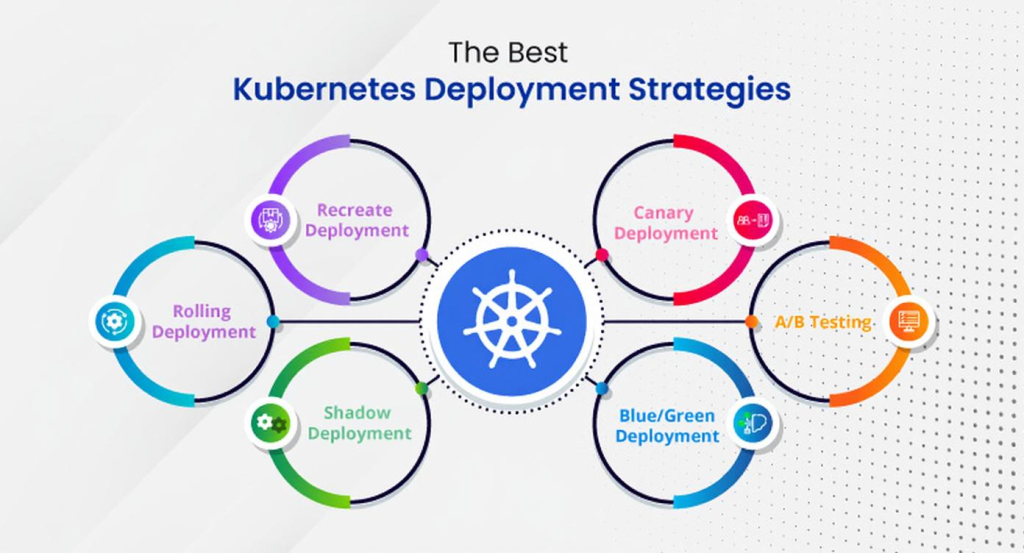
In DevOps, deployment strategies determine how new application versions are rolled out to production, balancing speed, reliability, and user experience. Kubernetes supports various strategies for production-grade clusters. This blog covers Recreate, Rolling Update, Blue-Green, Canary, Shadow, and A/B Testing deployments with minimal YAML configurations.
1. Recreate Deployment
Terminates all existing pods before deploying new ones, causing downtime. Suitable for non-critical applications.
Use Case: Internal tools, batch processing.
Pros:
- Simple implementation.
- Clean slate for new versions.
Cons:
- Downtime during deployment.
- Not for high-availability systems.
Kubernetes Implementation
Set strategy.type: Recreate in the Deployment spec.
Example YAML (Deployment):
apiVersion: apps/v1
kind: Deployment
metadata:
  name: my-app-recreate
  namespace: production
spec:
  replicas: 3
  selector:
    matchLabels:
      app: my-app
  strategy:
    type: Recreate
  template:
    metadata:
      labels:
        app: my-app
    spec:
      containers:
      - name: my-app
        image: my-app:2.0
        ports:
        - containerPort: 8080
Example YAML (Service):
apiVersion: v1
kind: Service
metadata:
  name: my-app-service
  namespace: production
spec:
  selector:
    app: my-app
  ports:
  - port: 80
    targetPort: 8080
  type: ClusterIP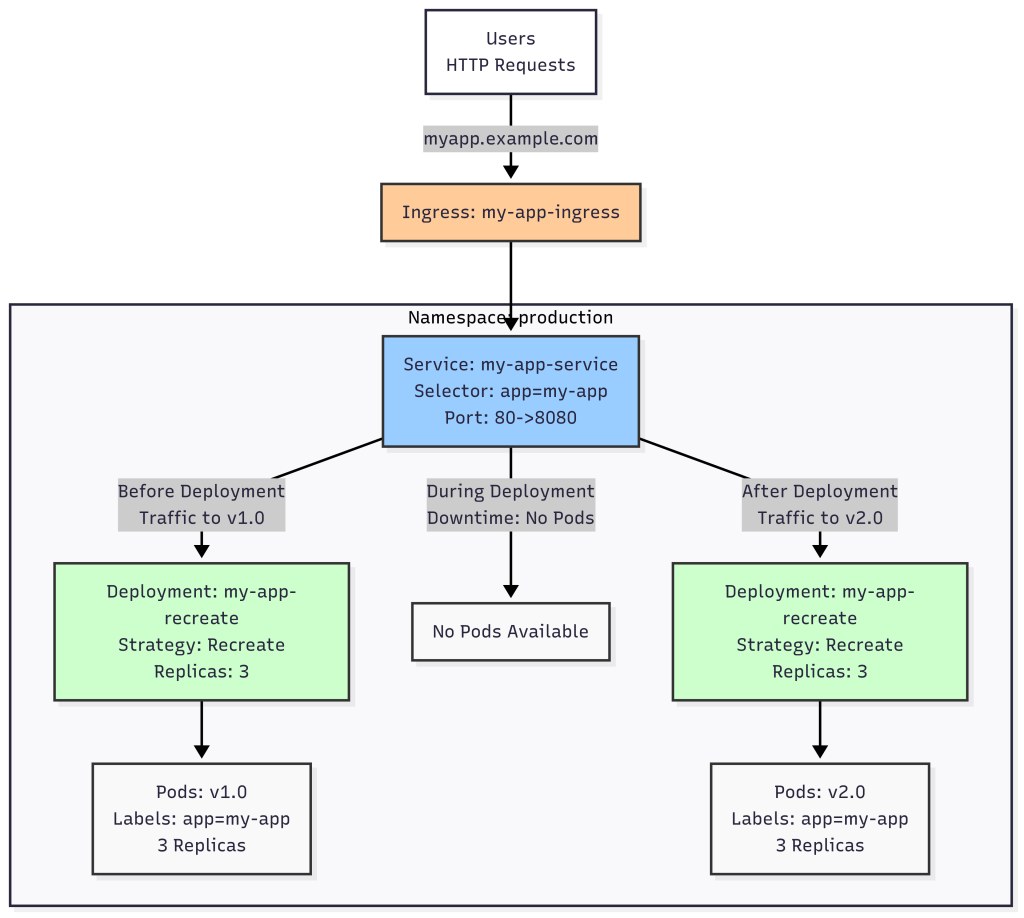
Explanation:
strategy.type: Recreateterminates all pods before deploying new ones.- Service routes traffic, but downtime occurs during deployment.
2. Rolling Update Deployment
Gradually replaces old pods with new ones, ensuring zero downtime. Kubernetes’ default strategy.
Use Case: Web services, APIs requiring high availability.
Pros:
- Zero downtime.
- Gradual rollout reduces risk.
Cons:
- Slower than recreate.
- Possible version mismatch during rollout.
Kubernetes Implementation
Use strategy.type: RollingUpdate with maxSurge and maxUnavailable.
Example YAML (Deployment):
apiVersion: apps/v1
kind: Deployment
metadata:
  name: my-app-rolling
  namespace: production
spec:
  replicas: 3
  selector:
    matchLabels:
      app: my-app
  strategy:
    type: RollingUpdate
    rollingUpdate:
      maxSurge: 1
      maxUnavailable: 0
  template:
    metadata:
      labels:
        app: my-app
    spec:
      containers:
      - name: my-app
        image: my-app:2.0
        ports:
        - containerPort: 8080
Example YAML (Service):
apiVersion: v1
kind: Service
metadata:
  name: my-app-service
  namespace: production
spec:
  selector:
    app: my-app
  ports:
  - port: 80
    targetPort: 8080
  type: ClusterIP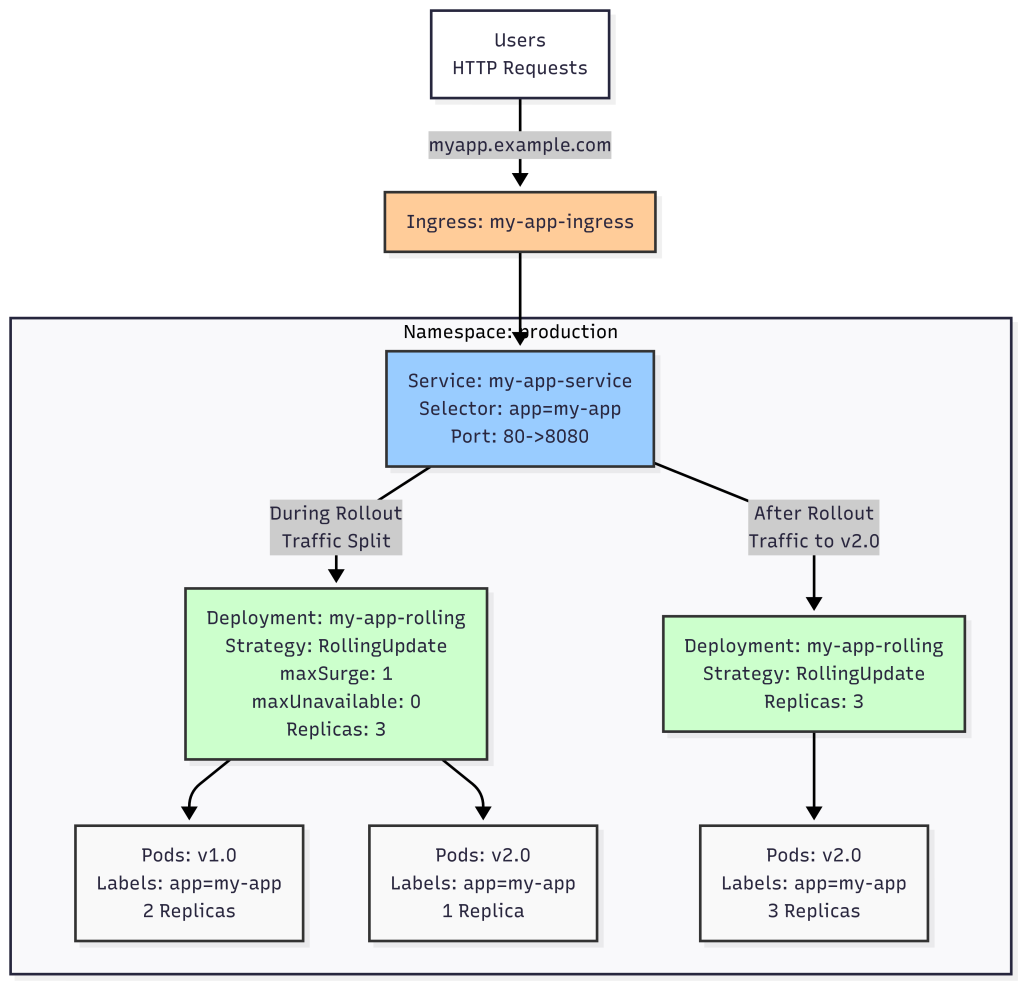
Explanation:
maxSurge: 1allows one extra pod.maxUnavailable: 0ensures no downtime.
3. Blue-Green Deployment
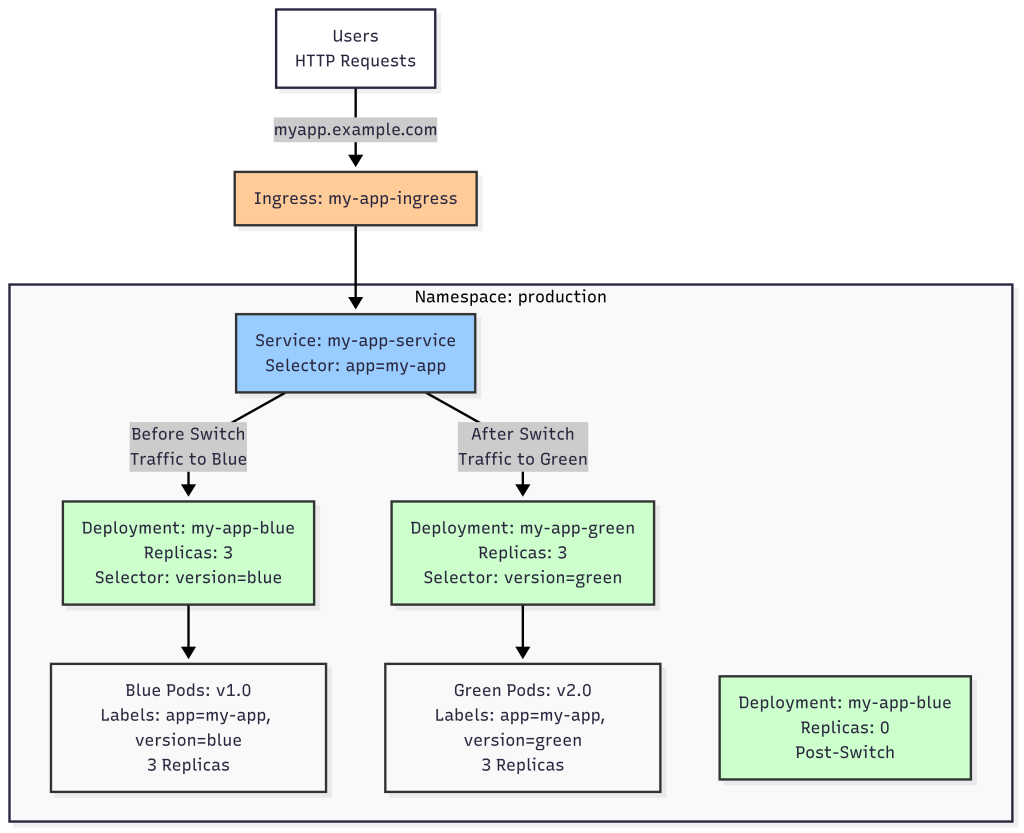
Maintains two environments: Blue (current) and Green (new). Traffic switches to Green after validation.
Use Case: E-commerce, financial services needing instant rollback.
Pros:
- Zero downtime with rollback capability.
- Easy validation of new version.
Cons:
- Requires double resources.
- Complex without tools.
Kubernetes Implementation
Manage two Deployment objects and switch Service selector.
Example YAML (Blue Deployment):
apiVersion: apps/v1
kind: Deployment
metadata:
  name: my-app-blue
  namespace: production
spec:
  replicas: 3
  selector:
    matchLabels:
      app: my-app
      version: blue
  template:
    metadata:
      labels:
        app: my-app
        version: blue
    spec:
      containers:
      - name: my-app
        image: my-app:1.0
        ports:
        - containerPort: 8080
Example YAML (Green Deployment):
apiVersion: apps/v1
kind: Deployment
metadata:
  name: my-app-green
  namespace: production
spec:
  replicas: 0
  selector:
    matchLabels:
      app: my-app
      version: green
  template:
    metadata:
      labels:
        app: my-app
        version: green
    spec:
      containers:
      - name: my-app
        image: my-app:2.0
        ports:
        - containerPort: 8080
Example YAML (Service):
apiVersion: v1
kind: Service
metadata:
  name: my-app-service
  namespace: production
spec:
  selector:
    app: my-app
    version: blue
  ports:
  - port: 80
    targetPort: 8080
  type: ClusterIP
Switching to Green:
- Scale Green:
kubectl scale deployment my-app-green --replicas=3 -n production - Test Green environment.
- Update service:
kubectl patch service my-app-service -n production -p '{"spec":{"selector":{"app":"my-app","version":"green"}}}' - Scale down Blue:
kubectl scale deployment my-app-blue --replicas=0 -n production
Explanation:
- Blue and Green run different versions.
- Service switches traffic to Green after validation.
4. Canary Deployment
Releases new version to a small user subset before full rollout.
Use Case: User-facing web apps, mobile backends.
Pros:
- Reduces risk with small-scale testing.
- Real-world feedback.
Cons:
- Requires traffic routing.
- Complex monitoring.
Kubernetes Implementation
Use two deployments and an ingress controller (e.g., NGINX) for traffic splitting.
Example YAML (Stable Deployment):
apiVersion: apps/v1
kind: Deployment
metadata:
  name: my-app-stable
  namespace: production
spec:
  replicas: 3
  selector:
    matchLabels:
      app: my-app
      track: stable
  template:
    metadata:
      labels:
        app: my-app
        track: stable
    spec:
      containers:
      - name: my-app
        image: my-app:1.0
        ports:
        - containerPort: 8080
Example YAML (Canary Deployment):
apiVersion: apps/v1
kind: Deployment
metadata:
  name: my-app-canary
  namespace: production
spec:
  replicas: 1
  selector:
    matchLabels:
      app: my-app
      track: canary
  template:
    metadata:
      labels:
        app: my-app
        track: canary
    spec:
      containers:
      - name: my-app
        image: my-app:2.0
        ports:
        - containerPort: 8080
Example YAML (Service):
apiVersion: v1
kind: Service
metadata:
  name: my-app-service
  namespace: production
spec:
  selector:
    app: my-app
  ports:
  - port: 80
    targetPort: 8080
  type: ClusterIP
Example YAML (Ingress):
apiVersion: networking.k8s.io/v1
kind: Ingress
metadata:
  name: my-app-ingress
  namespace: production
  annotations:
    nginx.ingress.kubernetes.io/canary: "true"
    nginx.k8s.io/canary-weight: "10"
spec:
  ingressClassName: nginx
  rules:
  - host: my-app.example.com
    http:
      paths:
      - path: /
        pathType: Prefix
        backend:
          service:
            name: my-app-service
            port:
              number: 80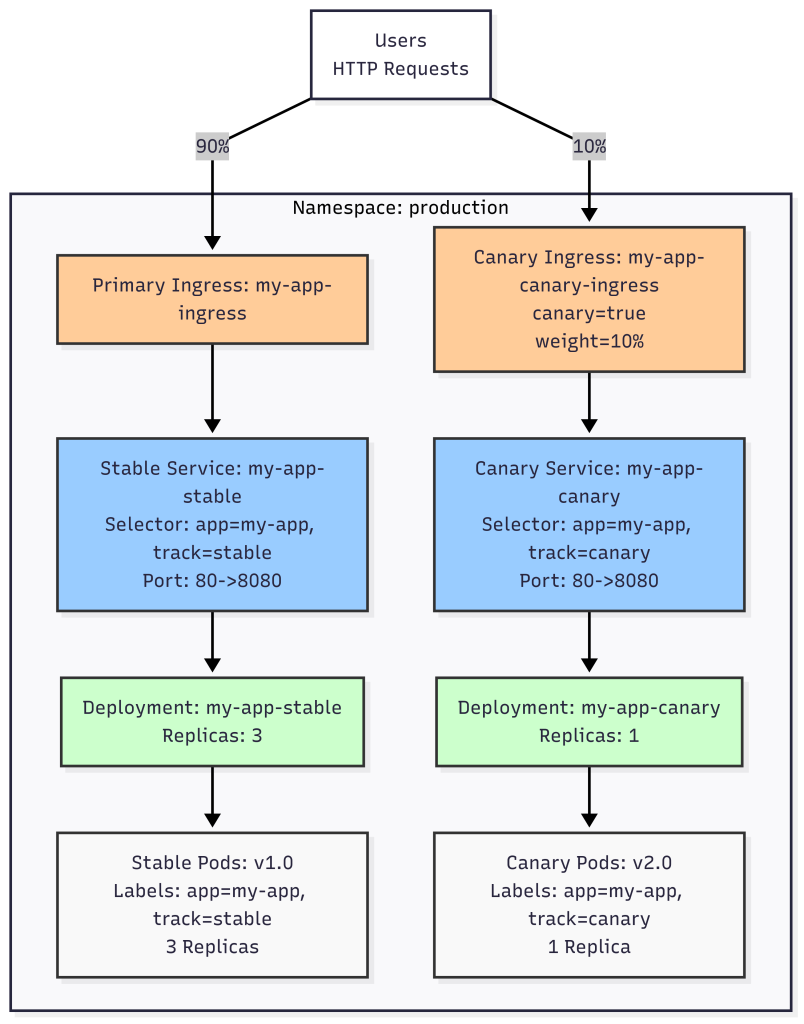
Explanation:
- Stable and canary deployments run concurrently.
- Ingress splits 10% traffic to canary (
track: canary). - Scale up canary or adjust weight for full rollout.
5. Shadow Deployment
Mirrors production traffic to the new version without affecting users.
Use Case: Performance or error rate testing.
Pros:
- Safe testing without user impact.
- Real-world performance data.
Cons:
- Complex traffic mirroring.
- Increased resource usage.
Kubernetes Implementation
Use Istio for traffic mirroring.
Example YAML (Stable Deployment):
apiVersion: apps/v1
kind: Deployment
metadata:
  name: my-app-stable
  namespace: production
spec:
  replicas: 3
  selector:
    matchLabels:
      app: my-app
      track: stable
  template:
    metadata:
      labels:
        app: my-app
        track: stable
    spec:
      containers:
      - name: my-app
        image: my-app:1.0
        ports:
        - containerPort: 8080
Example YAML (Shadow Deployment):
apiVersion: apps/v1
kind: Deployment
metadata:
  name: my-app-shadow
  namespace: production
spec:
  replicas: 1
  selector:
    matchLabels:
      app: my-app
      track: shadow
  template:
    metadata:
      labels:
        app: my-app
        track: shadow
    spec:
      containers:
      - name: my-app
        image: my-app:2.0
        ports:
        - containerPort: 8080
Example YAML (Service):
apiVersion: v1
kind: Service
metadata:
  name: my-app-service
  namespace: production
spec:
  selector:
    app: my-app
    track: stable
  ports:
  - port: 80
    targetPort: 8080
  type: ClusterIP
Example YAML (Istio VirtualService):
apiVersion: networking.istio.io/v1alpha3
kind: DestinationRule
metadata:
  name: my-app-destination
  namespace: production
spec:
  host: my-app-service.production.svc.cluster.local
  subsets:
  - name: stable
    labels:
      track: stable
  - name: shadow
    labels:
      track: shadow
---
apiVersion: networking.istio.io/v1alpha3
kind: VirtualService
metadata:
  name: my-app-vs
  namespace: production
spec:
  hosts:
  - my-app.example.com
  http:
  - route:
    - destination:
        host: my-app-service.production.svc.cluster.local
        subset: stable
      weight: 100
    mirror:
      host: my-app-service.production.svc.cluster.local
      subset: shadow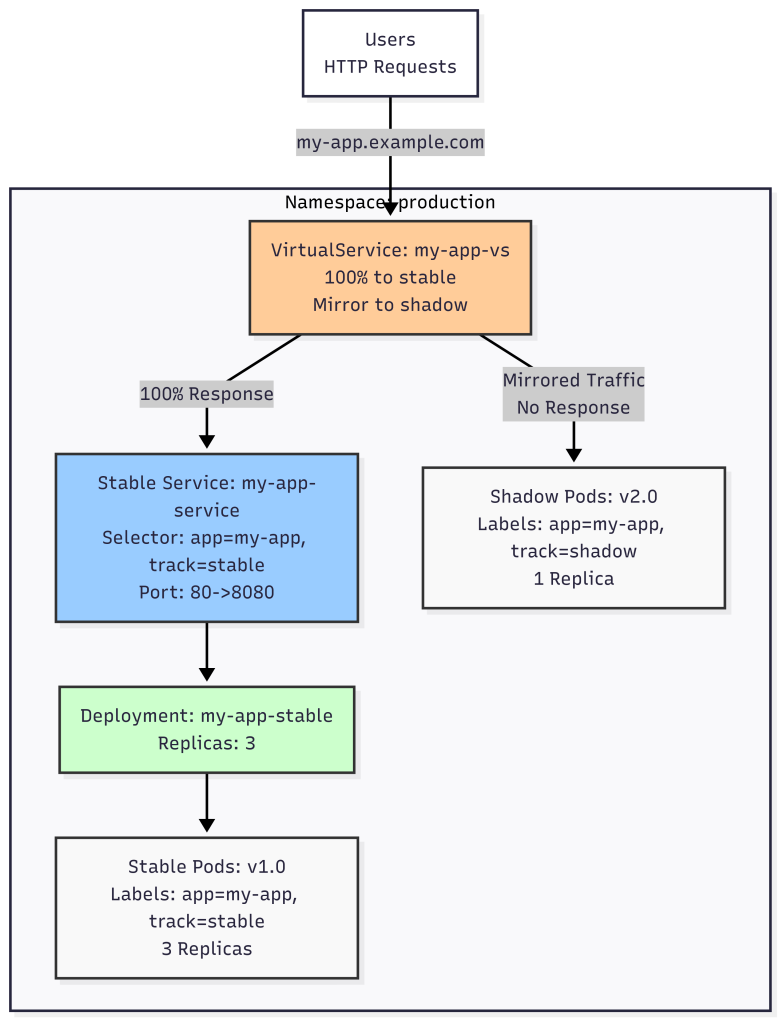
Explanation:
- Stable deployment serves production traffic.
- Shadow deployment receives mirrored traffic, with responses discarded.
6. A/B Testing Deployment
Deploys multiple versions, routing user segments to each for comparison.
Use Case: Testing features or UI changes in e-commerce or SaaS.
Pros:
- Data-driven decisions via user behavior.
- Flexible for multiple variations.
Cons:
- Requires sophisticated routing.
- Complex analysis.
Kubernetes Implementation
Use an ingress controller for user segmentation.
Example YAML (Version A Deployment):
apiVersion: apps/v1
kind: Deployment
metadata:
  name: my-app-a
  namespace: production
spec:
  replicas: 2
  selector:
    matchLabels:
      app: my-app
      version: a
  template:
    metadata:
      labels:
        app: my-app
        version: a
    spec:
      containers:
      - name: my-app
        image: my-app:1.0
        ports:
        - containerPort: 8080
Example YAML (Version B Deployment):
apiVersion: apps/v1
kind: Deployment
metadata:
  name: my-app-b
  namespace: production
spec:
  replicas: 2
  selector:
    matchLabels:
      app: my-app
      version: b
  template:
    metadata:
      labels:
        app: my-app
        version: b
    spec:
      containers:
      - name: my-app
        image: my-app:2.0
        ports:
        - containerPort: 8080
Example YAML (Service):
apiVersion: v1
kind: Service
metadata:
  name: my-app-service
  namespace: production
spec:
  selector:
    app: my-app
  ports:
  - port: 80
    targetPort: 8080
  type: ClusterIP
Example YAML (Ingress):
apiVersion: networking.k8s.io/v1
kind: Ingress
metadata:
  name: my-app-ingress
  namespace: production
  annotations:
    nginx.ingress.kubernetes.io/canary: "true"
    nginx.ingress.kubernetes.io/canary-by-header: "X-Version"
    nginx.ingress.kubernetes.io/canary-by-header-value: "b"
spec:
  ingressClassName: nginx
  rules:
  - host: my-app.example.com
    http:
      paths:
      - path: /
        pathType: Prefix
        backend:
          service:
            name: my-app-service
            port:
              number: 80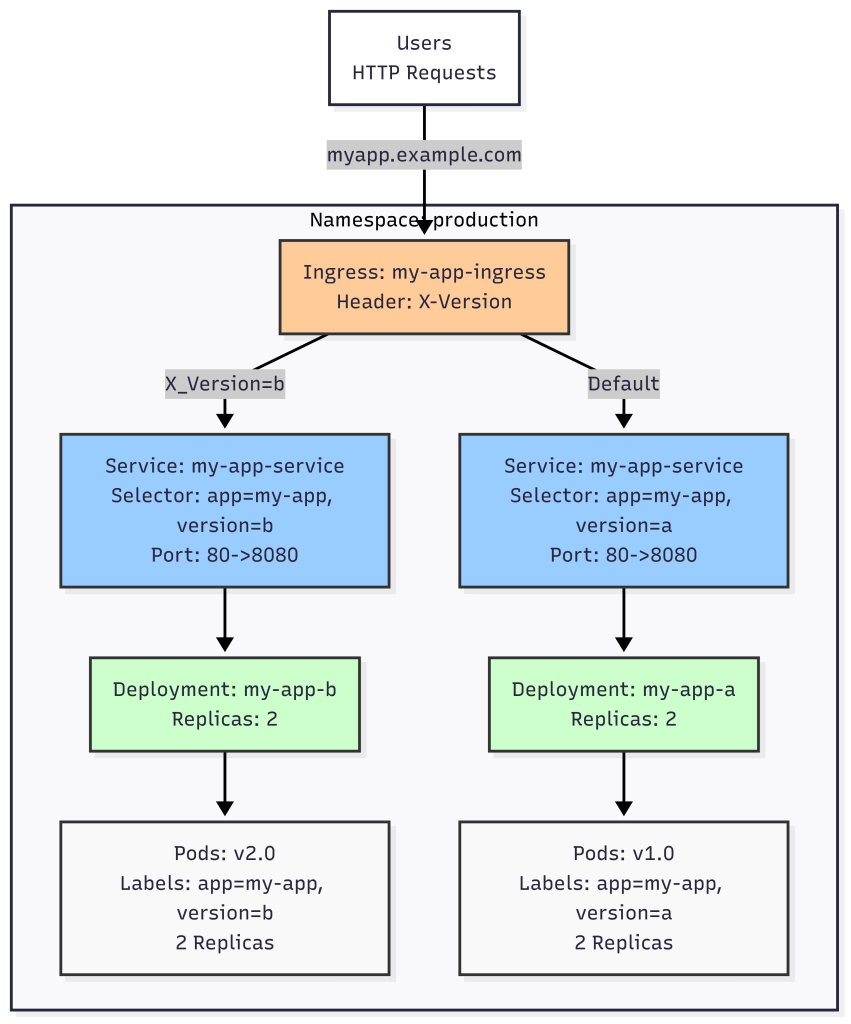
Explanation:
- Version A and B run concurrently.
- Ingress routes traffic to version B if
X-Version: bheader is present; otherwise, to version A.
Conclusion
Kubernetes offers diverse deployment strategies for production-grade clusters:
- Recreate: Simple, with downtime.
- Rolling Update: Zero-downtime default.
- Blue-Green: Instant switch with rollback.
- Canary: Gradual rollout.
- Shadow: Safe traffic mirroring.
- A/B Testing: User-segmented testing.